
Zigbee:路由设备(Router)按键入网实战
一、前言
上篇文章介绍了zigbee的功能,设备的类型和作用,网络ID,设备长地址,设备短地址,信道灯基础的概念,本篇开始正式介绍设备入网的一些知识了。
注意:设备入网的首要条件是,需要协调器创建一个网络,然后路由设备才能加入到该网络中,所以在进行该项实验开始,我们至少需要两块开发板,一块充当协调器,一块充当路由设备。另外说一下,为了配合zigbee的实战教程,我设计了一套开发板,有需要的小伙伴可以在文章的末尾帮我投个票,我统计下数量,后期好安排进行打样,感谢大家的支持。
二、阅读说明
1、芯科芯片开发学习者。
2、zigbee爱好者。
3、至少需要两块芯片为EFR32MG21A020F708IM32的开发板
三、正文
1、协议栈的选择
1.1、安装Pro Stack(Common)
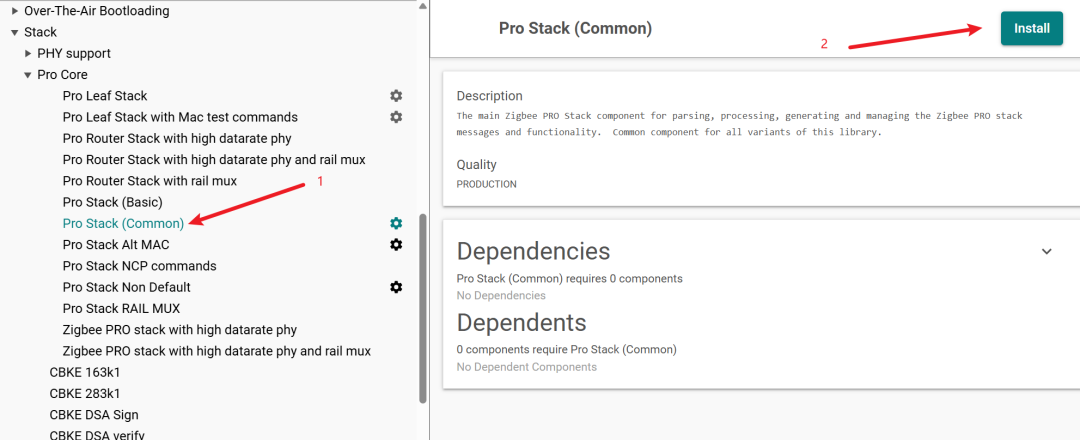
打开Simplicity Studio 6软件,选择当前的工程文件,然后选择software components,依次点击Zigbee-->Stack-->Pro Core-->Pro Stack(Common),之后点击Install。
备注:如果Pro Core中有其他的插件,先卸载掉
1.2、协议栈安装完成的的状态
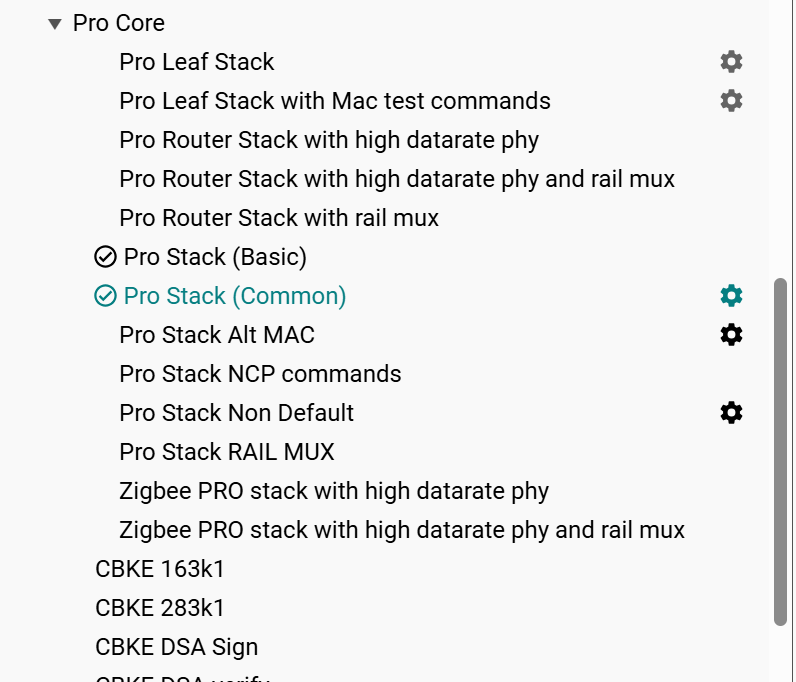
安装完成后,Pro Core中多了两个插件,一个是Pro Stack(Basic),另外一个是Pro Stack(Common)。
2、入网事件的编写
2.1、设置一个入网的事件结构体
static sl_zigbee_af_event_t button_network_steering_event;2.2、设置事件的触发函数
static void button_network_steering_event_handler(sl_zigbee_af_event_t *event)
{
  (void)event;

  sl_zigbee_af_network_steering_start();
}
2.3、初始化事件
sl_zigbee_af_isr_event_init(&button_network_steering_event,
                              button_network_steering_event_handler);
2.4、入网事件的完整代码
static sl_zigbee_af_event_t button_network_steering_event;

static void button_network_steering_event_handler(sl_zigbee_af_event_t *event)
{
  (void)event;

  sl_zigbee_af_network_steering_start();
}

void app_init()
{
  // Initialize the ISR event so it can be activated from the button ISR.
  sl_zigbee_af_isr_event_init(&button_network_steering_event,
                              button_network_steering_event_handler);
}
这里我将这个button_network_steering_event的初始化函数放在了app_init()中,这个app_init()软件里面自带可以重新编写的函数,在这里我放在了app.c的文件中。
3、在按键处理函数中增加事件触发函数
void sl_button_on_change(const sl_button_t *handle)
{
  if(handle == &sl_button_btn0)
  {
    if(sl_button_get_state(handle) == SL_SIMPLE_BUTTON_PRESSED)
    {
      sl_zigbee_app_debug_println("button is pressed");

      sl_zigbee_af_event_set_active(&button_network_steering_event);
    }
    else {
      sl_zigbee_app_debug_println("button is released");
    }
  }
}
如上图所示,在按键sl_button_btn0被按下的时候,触发button_network_steering_event事件,随后开始调用button_network_steering_event_handler函数,然后button_network_steering_event_handler中的sl_zigbee_af_network_steering_start被调用。该函数的意思主要是用来入网,详细的解释如下:
/** @brief Initiate a network-steering procedure.
 *
 *
 * If the node is currently on a network, it performs network steering
 * in which it opens up the network with a broadcast
 * permit join message.
 *
 * If the node is not on a network, it scans a series of primary channels
 * (see ::sli_zigbee_af_network_steering_primary_channel_mask) to find possible
 * networks to join. If it is unable to join any of those networks, it
 * tries scanning on a set of secondary channels
 * (see ::sli_zigbee_af_network_steering_secondary_channel_mask). Upon completion of
 * this process, the plugin calls
 * ::sl_zigbee_af_network_steering_complete_cb with information regarding
 * the success or failure of the procedure.
 *
 * This procedure will try to join networks using install codes, the centralized
 * default key, and the distributed default key.
 *
 * @return An ::sl_status_t value that indicates the success or failure of
 * the initiating of the network steering process. The function may also return the success or
 * failure of sl_zigbee_af_permit_join() if the device is already in a network and the function is called.
 * - ::SL_STATUS_INVALID_STATE if both channel masks are not configured or network steering is in process.
 * - ::SL_STATUS_FAIL is scan queue is full.
 * - ::SL_STATUS_OK if the device has started scanning.
 *
 * @note Do not call this API from a stack status callback, as this plugin acts
 * when its own stack status callback is invoked.
 */
sl_status_t sl_zigbee_af_network_steering_start(void);
该函数所在的路径:Zigbee_Switch_ZR\simplicity_sdk_2026.6.1\zigbee\app\framework\plugin\network-steering\network-steering.h
4、RTT中的log打印结果
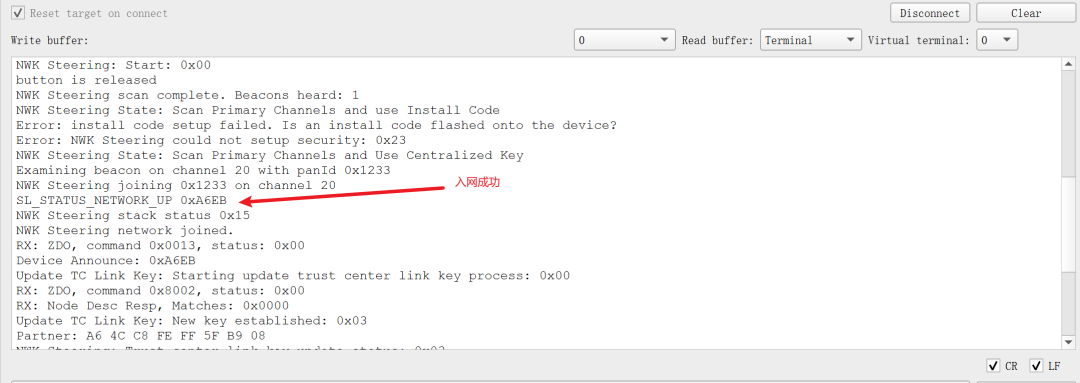
> NWK Steering: issuing scan on primary channels (mask 0x02108800)
NWK Steering: Start: 0x00
button is released
NWK Steering scan complete. Beacons heard: 1
NWK Steering State: Scan Primary Channels and use Install Code
Error: install code setup failed. Is an install code flashed onto the device?
Error: NWK Steering could not setup security: 0x23
NWK Steering State: Scan Primary Channels and Use Centralized Key
Examining beacon on channel 20 with panId 0x1233
NWK Steering joining 0x1233 on channel 20
SL_STATUS_NETWORK_UP 0xA6EB
NWK Steering stack status 0x15
NWK Steering network joined.
上述是入网的关键log。
四、结尾
本文讲解了如何通过按键的方式实现了路由设备的入网,对于我们应用层来讲只需要调用一个sl_zigbee_af_network_steering_start()函数即可,下一篇将对该入网的程序进行完善,增加灯效用来提醒用户。
备注:本次实验需要用两块开发板,一块当作路由设备,另一块当作协调器,本篇只是讲解了路由设备,协调器设备会在之后的文章中讲解。